| « 4th of July | Sources for Miscellaneous Supplies needed in Manufacturing Emulsions » |
New Website Changes
Helping you Make the Most of your Browsing Time
Easier Navigation of the Ingredients To Die For Website
At Ingredients To Die For we are always working hard to make your shopping expeience, with us, a little less stressful, and a lot more enjoyable. We understand how valuable your time is and we ran a poll to see how we could help. The results were, overwhelmingly, that you wanted to see improvements in the search features, as well as imrprovements in the main drop down menu, to reduce scrolling in both areas. We put our IT department to the test and they came through with flying colors. Now the website can be searched, very easily, to make your shopping experience much more enjoyable, and a lot less irritating. Read on to see what the new features are and how to get the most out of the search engine, and main drop down menu, for more efficient use of your, valuable, time.
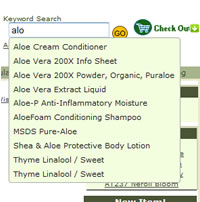 SEARCH BOX ENHANCEMENT … With our, extensive, assortment of ingredients, and bases, it used to be that when you used the search box it would sometimes display 40, or 50, items, using that ingredient, and then every time that you clicked on something it refreshed the whole page, making you have to keep scrolling back down to get to the list. This was a little bothersome, even for us.
Now, you can just start typing the first letters, of any product name*, and the search box will display a, alphabetized, drop down, list of every item that contains those letters, or that word, then you simply put your cursor over the product, in the drop down list, click to make your selection, click go, and that is it. For some items there may still be several matches but, the drop down reduces the matches considerably. Simple as that! If you don't select anything, from the drop down, then you won't be utilizing any of the benefits, of the upgrades, and the search will grab everything, like before, that contains those letters, and you may still get 40, or 50, items.
QUICK TIP :: you can always search using the product code, in the upper left hand corner, of the product label, to find something really fast.
*NOTE :: The item drop down is a small box and there's only so many letters that will fit, so, if the names are too short to see what the full name is just put your cursor over the name, wait just a second, and it will display the entire name.
CART ENHANCEMENTS …
 Now there is a “quick add” pop-up that will display with every item*, on the website, whenever your cursur is along the top line of the item box, so that you can just click that pop-up to get the size options, if you don't need to see the details about the item, and quickly add that item, to your cart, simply put your cursur over the size that you'd like, click to make you selection, click the “add to cart” button, and it will add that item and display your cart, then you can, either, check out, if you're finished shopping, or just click the X in the upper right hand corner, of the cart box, to close your cart. Of course, you can still click on the cart button, in the upper right hand corner of the screen, to go to your cart at any time but, now you don't have to go to your cart and then use the back button, or the product catalog, to get back to where you were.
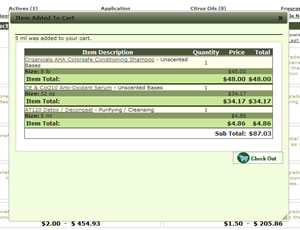 You can also quickly see what is in your cart by clicking on the little green drop down arrow, next to the cart button, and it will display your cart, without taking you to your cart and losing your place, then, if you're still shopping, just click the X, in the upper right hand corner, to close your cart, or click the “check out” button if you're finished shopping.
Now when you are on your cart page you can select different shipping options, to see what the shipping cost is, without having to hit the “update cart” button, in between each selection, making it fast, and easy, to see what the shipping costs will be for your order.
*NOTE :: the pop-up does display for every item, available through the website, with the only exception being those items that are exclusive to one customer, so it will also be available for formulary items, that do not have a purchase option, in which case it will not go anywhere when you click on it.
CATALOG TREE ENHANCEMENTS …
Now when you are searching through the Product Catalog the center page will only refresh for the actual category. When you are looking at sub-caterogies it will only refresh the center page so that you no longer have to keep scrolling back to your place in the Product Catalog.
When you are working in the center of the page, going from page to page, of items, it will no longer refresh the whole page, it will only refresh the items, on the next page, so you no longer have to scroll back down to get back to where you were.
LOG IN ENHANCEMENT …
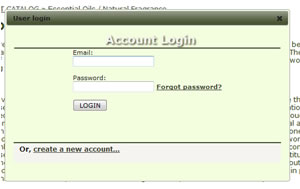 Now when you want to log in, you can do that from anywhere on the website, and it will open up a pop-up box so that you can log in without losing your place.
NEW ADDITION TO THE WEBSITE . . . We have added a pop-up box of Tech Tips … these are, customer driven, “quick tips” from our technical support department. There are multiple categories, within the “tech tips” so there is bound to be something useful that pops up during your time at our website ... from essential oil blending tips, to formulation enhancements, to definitions … If you dont' want the pop-up, on your screen, simply click the X, in the upper right hand corner, to close it. These “tech tips” are set up to scroll every minute so if you see something that interests you be sure to copy it so that you can read it before it refreshes*. We have loaded, this feature, with over a hundred “tech tips”, and we will continue to add to it as we get questions from our customers, that aren't already covered, so every customer will be able to see an assortment of “tips” with each session at our website.
* No need to worry if you saw something, and were only half finished reading it before it refreshed. We have added the entier list of “tech tips” to our Library so you can just to go the Library and open the PDF to see a list of all of the “tech tips”.

Happy Shopping!
The Ingredients To Die For staff.
 This entry was posted on May 21, 2012 at 07:54 pm by blogger and is filed under Welcome, Latest News.